Overview
AI-powered first-pass review of issued financial statements—review findings, annotate, and export.
Overview
Agentive Financial Statement Review is an AI-powered, first-pass review of your issued financial statements. It helps you quickly surface potential issues, work them (or dismiss them) with clear annotations, and export your review notes for the file.
This is a review accelerator, not a replacement for professional judgment. Use it as a quality-control pass before sign-off.
What it checks (at a high level)
Financial Statement Review runs three review modes. In the overview, you just need to know what each mode is for:
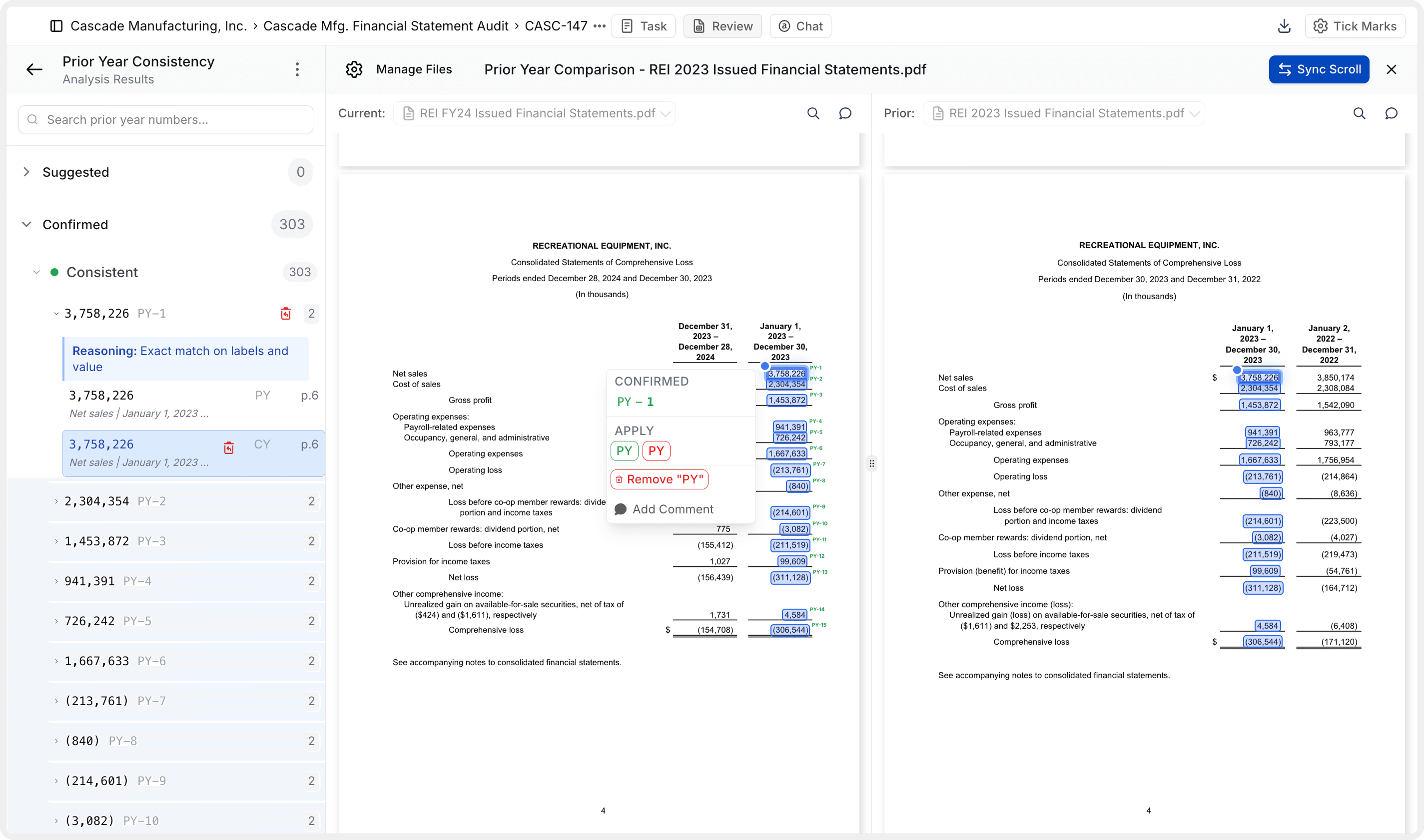
Prior Year Consistency
Compares your current-year package against the prior-year package (when provided).
Internal Consistency
Checks that the same amounts referenced in different places agree within the current-year package.
Mathematical Accuracy (Foot / Crossfoot)
Validates totals in tables and provides a calculator-style breakdown for the math.
Get started (create + upload)
To start a Financial Statement Review, make sure you’re in the correct engagement, then create a new review and upload your PDFs.
Create the review
- Go to Create
- Select Financial Statement Review
- Optionally update the title, then click Create
Upload your statements
- Prior-year financial statements (optional): upload if you have them
- Current-year financial statements (required): upload the package you want to review
Wait for results
- The analysis typically takes 3–10 minutes, depending on file size and complexity.
Core UX concepts (how you’ll work)
Once results are ready, the workflow is consistent across modes:
Document viewer is the source of truth
Review findings in context by navigating directly to the spot in the PDF.
Sidebar navigation
You can scroll through the document, or jump straight to significant findings using the sidebar.
Suggested vs. confirmed (progress tracking)
Confirming a finding is optional and is used to track your progress in the sidebar.
Review findings (and annotate)
When you open any finding, Agentive will show its reasoning (and in Mathematical Accuracy, a calculator-style breakdown). You can then take action:
Apply suggested action
Add the suggested tick mark/annotation to reflect your disposition.
Remove / dismiss
If you believe the finding is not relevant (e.g., false positive), you can remove it.
Apply a different tick mark
Choose a different tick mark when your conclusion differs from the suggestion.
You can also:
- Add a comment to document your reasoning
- Add your own tick marks/comments anywhere (for missed items or notes you want in the file)
In Foot / Crossfoot, Agentive may miss a number in its analysis. You can correct this using the calculator view by highlighting the missing number in the document, then saving the updated result.
Bulk actions (when you want speed)
If you’re applying tick marks repeatedly, you can bulk apply actions for an entire grouping/category from the sidebar (using the “apply all” control).
Export results
At any time, you can export your current status of annotations:
- Click Download (top right)
- Select Files with annotations
This download includes your tick marks and comments.
Troubleshooting (common fixes)
Two common issues from real usage:
Prior-year comparisons look “off”
Check your engagement settings and ensure your audit period is set correctly. Agentive uses this to determine what “prior year” means in the analysis.
Large tables that span pages
Use Merge Tables mode to merge tables horizontally or vertically (including across pages), then re-run the analysis to correct issues caused by split tables.
Questions or edge cases? Reach out via live support on Teams.
How is this guide?